Creating a copy of a column with a new name is pretty simple in DAX: you can just use the AddColumns() function. For example if we take a model with the DimProductCategory table from Adventure Works in, we could create a copy of the EnglishProductCategoryName column like so:
evaluate
addcolumns(
DimProductCategory
, "Copy of Category Name"
, DimProductCategory[EnglishProductCategoryName])

However, in some calculations and queries I’ve been playing around with, this isn’t enough: I’ve not only needed to create a copy of the column but also to remove the original. So for example to crossjoin the DimProductCategory table with itself and get a cartesian product of all the possible combinations of Category name you can’t just do this:
evaluate
crossjoin(
summarize(
DimProductCategory
, DimProductCategory[EnglishProductCategoryName])
,
summarize(
DimProductCategory
, DimProductCategory[EnglishProductCategoryName])
)
Because you’ll get the following error:
Function CROSSJOIN does not allow two columns with the same name ‘DimProductCategory'[EnglishProductCategoryName].
What you need to do is add the new column with AddColumns() and then use Summarize() to get a new table that only contains the values in this new column, like so:
evaluate
crossjoin(
summarize(
DimProductCategory
, DimProductCategory[EnglishProductCategoryName])
,
summarize(
addcolumns(
DimProductCategory
, "Copy of Category Name"
, DimProductCategory[EnglishProductCategoryName])
, [Copy of Category Name])
)
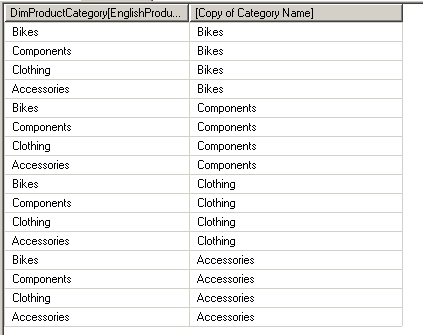

This column aliasing technic is key when dealing with many-to-many relationship.
The CrossJoin will not work until you have renamed one of the Key.
When using a Bridge Table usually you will keep the original name of the Keys. It’s not an issue until dealing with DAX Queries.
EXAMPLE
BridgeTable1Table2 (FK1,FK2)
DimTable1 (FK1, Attribute1)
DimTable2 (FK2, Attribute2)
FactTable (Key1,FK1,Attribute3)
Until you rename FK1 in BridgeTable1Table2 or FactTable, you will not be able to do a CrossJoin on FactTable and BridgeTable1Table2 (required to propagate filters)
You don’t actually need to use Crossjoin() for many-to-many relationships; the standard way of handling them in DAX is this: http://blog.gbrueckl.at/2012/05/resolving-many-to-many-relationships-leveraging-dax-cross-table-filtering/