Following on from my last post, let’s now see how we can do group-by style in DAX queries.
The key to aggregating data is the Summarize() function, which is broadly similar to a Group By in SQL. So if the following query returns every row from the FactInternetSales table:
evaluate(
FactInternetSales
)
The following query just returns a list of all the distinct combinations of values from the OrderDateKey and CustomerKey columns:
evaluate(
summarize(
FactInternetSales
, FactInternetSales[OrderDateKey]
, FactInternetSales[CustomerKey]
)
)
order by
FactInternetSales[OrderDateKey]
, FactInternetSales[CustomerKey]
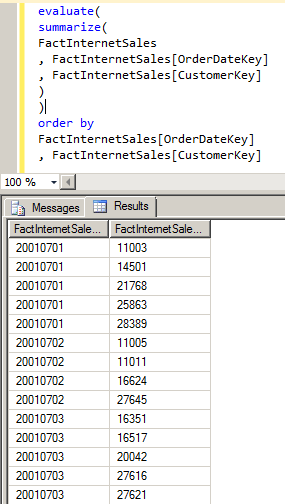
Once we’ve specified the name of the table in the first parameter of Summarize, we can then supply a list of columns in the table to group by. This list can contain any number of columns, but we can also do aggregations inside Summarize by supplying a list of column names and DAX numeric expressions after the list of columns. So, for example:
evaluate(
summarize(
FactInternetSales
, FactInternetSales[OrderDateKey]
, “Sum of Sales”
, Sum(FactInternetSales[SalesAmount])
, “Distinct Customers”
, DistinctCount(FactInternetSales[CustomerKey])
)
)
order by
FactInternetSales[OrderDateKey]
Gives us the sum of the SalesAmount column and the number of distinct values in CustomerKey, for each distinct OrderDateKey value, as extra columns in the resultset.

We can also reference columns from related tables in our aggregations. So for example this query uses the DimDate table and gives us data aggregated up by year:
evaluate(
summarize(
DimDate
, DimDate[CalendarYear]
, “Sum of Sales”
, Sum(FactInternetSales[SalesAmount])
, “Distinct Customers”
, DistinctCount(FactInternetSales[CustomerKey])
)
)
order by
DimDate[CalendarYear]

Finally (at least for today), we can do subtotalling by using the Rollup() function inside our list of group by columns; each column we list inside Rollup() will work like a regular group by column but it will also have a subtotal row added for it in the resultset. So here, for example, is the query above with an extra group by on the days of the week:
evaluate(
summarize(
DimDate
, DimDate[CalendarYear]
, ROLLUP(DimDate[EnglishDayNameOfWeek])
, “Sum of Sales”
, Sum(FactInternetSales[SalesAmount])
, “Distinct Customers”
, DistinctCount(FactInternetSales[CustomerKey])
)
)
order by
DimDate[CalendarYear]
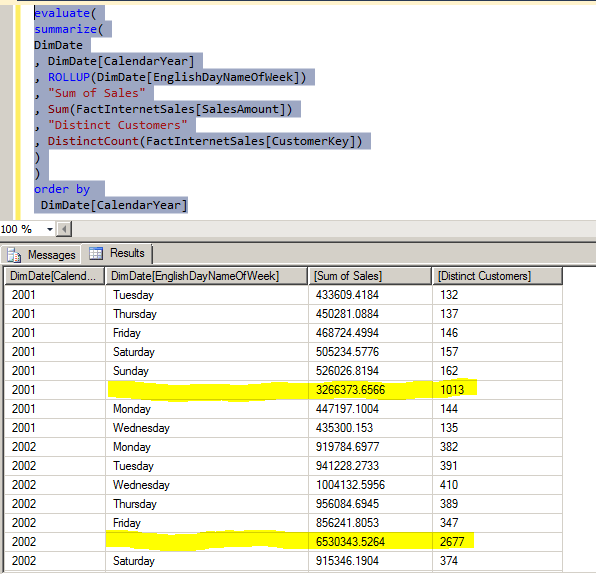
I’ve highlighted the subtotals rows here, but we can also identify these rows using the new IsSubTotal() function:
evaluate(
summarize(
DimDate
, DimDate[CalendarYear]
, ROLLUP(DimDate[EnglishDayNameOfWeek])
, “Sum of Sales”
, Sum(FactInternetSales[SalesAmount])
, “Distinct Customers”
, DistinctCount(FactInternetSales[CustomerKey])
, “Is this a SubTotal?”
, if(IsSubtotal(DimDate[EnglishDayNameOfWeek]), “Yes”, “No”)
)
)
order by
DimDate[CalendarYear]

In part 3, I’ll take a look at how to add derived columns.

Fantastic post Chris, great examples.
Great post Chris. Dan/Chriss,, I’ve been a very silent follower of Olap Services through SSAS 2k8r2. I was very active conversationally with Mosha 2001/2002 and have been very busy with implementation ever since. Now, I’m felling the same apprehensions you (Chris) did in your earlier posts about denali and the tabular direction. I thought nothing of it until I got reporting service style results in my CTP3 analysis services browser – I’m very upset – where is the pivot functionality – I cant find it :(….. Anyway, following posts avididly in a hop my 12 year career with OLAP isn’t over.
It is unfortunate and many people like that functionality. If you want that you will have to use Excel because the Office Web Components technology is a deprecated feature – http://support.microsoft.com/kb/972129 – and has been for quite some time now.
Hey Chris, I have been going through all of your posts but could not found conversion of KPI functions of MDX in DAX. Functions like KPIValue, KPIGoal, KPIStatus and KPITrend. I am trying to create a SSRS report using a KPI, but for that I need to get its Goal/ Target value and there is no function in DAX which can provide this property of KPI. Please help.
You’re right, there are no DAX functions that return KPI values. I’m 99% sure that there’s no way to get the value of a KPI in DAX (this would explain why, like hierarchies, there’s no support for them in Power View: http://cathydumas.com/2012/04/03/using-or-not-using-tabular-kpis/) unfortunately; you’ll have to use MDX to query your Tabular model instead.
Chris,
I am stuck at a point where my shared(main) dataset is being used by multiple reports.The requirement is to have a multi value parameter as optional for one report and mandatory for the other report.I googled the web a lot example:to allow null within the drop down etc but didnt find the solution.My main dataset query contains the below in filter like:
PATHCONTAINS (
SUBSTITUTE (
SUBSTITUTE ( SUBSTITUTE ( @Salesperson, “{ “, “” ), ” }”, “” ),
“&”,
“|”
),
‘SalesPeople'[SALESPERSON]
)
This works for the report to allow users to select muliple values for 1 report,but the other report complains of multiple issues because I do not know how to condition the optional part in the main query.
Sorry, can you give me more details about what you’re trying to do here and what the error is please?
Basically,I have a salesperson DAX that populates the @Salesperson.I have a shared dataset :
EVALUATE
(
ADDCOLUMNS (
FILTER (
SUMMARIZE (
‘Revenue’,
‘Revenue'[Account],
‘Revenue'[Status],
‘SalesPeople'[SALESPERSON]
),
PATHCONTAINS (
SUBSTITUTE (
SUBSTITUTE ( SUBSTITUTE ( @Salesperson, “{ “, “” ), ” }”, “” ),
“&”,
“|”
),
‘SalesPeople'[SALESPERSON]
),
“Quantity sum”, ‘RevenueAndCost'[Sum of Quantity]
)
)
I want to make @Salesperson as optional in one report and mandatory for the other report.The parameter populates all the salesmen with “select all” value and works fine for the report where users select some values.But this fails for the other report where I am passing the parameter as internal with “All” selected as default.
Can you run a trace on the server and see whether the DAX query that is generated is valid?