The last non empty semi-additive measure aggregation functionality in SSAS enterprise edition is very useful, but it doesn’t support one common business requirement: while it will give you the last non empty value within any given time period, it doesn’t handle the variation where you want to get the last non empty value of a measure from all preceding time periods (this is what I’m calling the ‘last ever non empty’ value). There are a number of business scenarios where you’d want to do this, for example finding the value of the last purchase a customer made, the last price you sold a product at, and the stock level of a product in a shop the last time a sales rep visited. Traditional MDX solutions to this problem have suffered from poor performance but in this blog post I’ll describe a new approach that performs much better; I think it will be very useful to a lot of people, and I’m quite proud of it!
Let’s take the following MDX query on Adventure Works as an example of the problem:
SELECT
HEAD([Customer].[Customer].[Customer].MEMBERS, 10)
*
{[Measures].[Internet Sales Amount]}
ON 0,
NON EMPTY
[Date].[Date].[Date].MEMBERS
ON 1
FROM [Adventure Works]
Here’s part of the results:

From this we can see that individual customers only bought from us once or twice. Now, for any date, let’s create a calculation that will find what the value of the last purchase by any given customer was, regardless of however long ago it was. Up until last week I’d have tackled this problem using a combination of the NonEmpty and Tail functions – for each customer and date, get the set of all preceding dates, find the dates which had values and find the value of the last date. Here’s the code:
WITH
MEMBER MEASURES.[Last Sale Original] AS
TAIL(
NONEMPTY({NULL:[Date].[Date].CURRENTMEMBER} * [Measures].[Internet Sales Amount])
).ITEM(0)

SELECT
HEAD([Customer].[Customer].[Customer].MEMBERS, 10)
*
{[Measures].[Internet Sales Amount],MEASURES.[Last Sale Original]}
ON 0,
[Date].[Date].[Date].MEMBERS
ON 1
FROM [Adventure Works]
And here’s the part of the results dealing with the first customer, Aaron A. Allen:
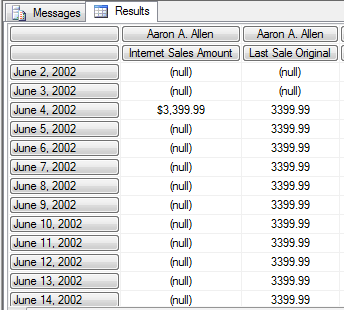
On my laptop the query takes 14 seconds to run, and that’s with only 10 customers on columns (it executes in cell-by-cell mode, I think); in many real world scenarios this kind of performance isn’t acceptable and that was certainly the case with the customer I was working with last week. So I came up with the following new MDX that does the same thing much faster:
WITH

MEMBER MEASURES.DAYSTODATE AS
COUNT(NULL:[Date].[Date].CURRENTMEMBER)-1

MEMBER MEASURES.HADSALE AS
IIF([Measures].[Internet Sales Amount]=0, NULL, MEASURES.DAYSTODATE)

MEMBER MEASURES.MAXDATE AS
MAX(NULL:[Date].[Date].CURRENTMEMBER, MEASURES.HADSALE)

MEMBER MEASURES.LASTSALE AS
IIF(ISEMPTY(MEASURES.MAXDATE), NULL,
([Measures].[Internet Sales Amount],
[Date].[Date].[Date].MEMBERS.ITEM(MEASURES.MAXDATE)))


SELECT
HEAD([Customer].[Customer].[Customer].MEMBERS, 10)
*
{[Measures].[Internet Sales Amount]
,MEASURES.[LASTSALE]}
ON 0,
[Date].[Date].[Date].MEMBERS
ON 1
FROM [Adventure Works]
On my laptop this query now executes in 3 seconds. Here’s what it’s doing:
- First of all the DaysToDate measure returns the zero-based index of the current date within the set of all dates, so the first date in the time dimension would have index 0, the second 1 and so on. This could be replaced by a real measure to get slightly better performance but I left it as a calculated measure for the sake of clarity.
- Next, the measure HadSale returns the index of the current date if it has a value and null otherwise.
- Next, the measure MaxDate returns the maximum value of HadSale for the set of all dates from the beginning of time up to the current date. This will give us the index of the last date which had a value.
- Finally we can take this index and, using the Item function, get the value of Internet Sales Amount for the last date that had a value.
If we want to take this approach and apply it to a server-based calculation, and make it work at all levels on the Date dimension, we need a slight variation. Again using the Adventure Works cube to illustrate, here’s what you need to do…
First of all, you need to create a new column in your fact table that contains only null values and use this as the basis of a new real (ie not calculated) measure, which should be called MaxDate. This should have the aggregation function Max.

You then need to add the following code to the MDX Script of the cube:
CREATE MEMBER CURRENTCUBE.MEASURES.DAYSTODATE AS
COUNT(NULL:[Date].[Date].CURRENTMEMBER)-1
, VISIBLE=FALSE;

CREATE MEMBER CURRENTCUBE.MEASURES.HADSALE AS
IIF([Measures].[Internet Sales Amount]=0, NULL, MEASURES.DAYSTODATE)
, VISIBLE=FALSE;

SCOPE(MEASURES.MAXDATE, [Date].[Date].[Date].MEMBERS);
    THIS = MAX(NULL:[Date].[Date].CURRENTMEMBER, MEASURES.HADSALE);
END SCOPE;

CREATE MEMBER CURRENTCUBE.MEASURES.LASTSALE AS
IIF(ISEMPTY(MEASURES.MAXDATE), NULL,
([Measures].[Internet Sales Amount],
[Date].[Date].[Date].MEMBERS.ITEM(MEASURES.MAXDATE)));
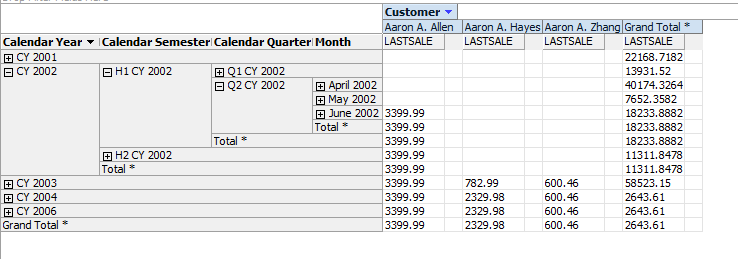
This does basically the same as the previous example only now MaxDate is a real measure instead of a calculated measure, and we’re using a scoped assignment to overwrite its value at the Date level. Above the Date level the default aggregation method of the MaxDate measure kicks in and we see the Max value of MaxDate for all dates in the current time period – which means at the month, quarter and year level we once again get the index of the last non empty date. Here’s what the result looks like in the cube browser:

Very useful script!! thanks for that Chris.
There are lots of practical examples where this will be useful in the retail sector; with the examples that you cited, but also on tables that contain only “Starting Dates” for prices for example (to find the latest “ever” active price).
Also thinking about it, it might open the door for more in depth basket analysis…
Philippe
HI Chris this is beautifull discovery 🙂 I recently used the “lookup” technique on some ssas forum thread but never thought of using it this way. Great finding.
Hrvoje
Really innovative way of thinking… Pretty sure this would come into use in a lot of manufacturing/retail scenarios. I really couldn’t believe it when the results came in less than 3 seconds.
Great work Chris!!! ( as usual 😉 )
Cool 🙂 Wouldn’t a recursion do similarly well?
WITH y AS
IIF([Internet Sales Amount]=0,
([Date].[Date].PrevMember,y),
[Measures].[Internet Sales Amount])
I’ve had a lot of bad experiences with recursive calculations in the past – in some cases they perform ok, but in many cases the performance is bad and unpredictable – so I try to avoid them.
In any case, I’ve just tested the same query with 1000 customers and with my approach it returns in 1:28; with a recursive calculation it returns in 1:37, so there’s still a slight advantage to my method.
Very nice Chris. I will use this implemenntation. Thanks for helping us out with faster/better MDX.
Paul Goldy – WhiteCloudAnalytics
Very nice and once again innovative thinking outside-of-the-box. I have used recursive in the past and have not been a fan of that approach at all. Will definitely review my process with this approach. Thanks for sharing.
Its interesting that recursion seems to work better for smaller column sizes and chris’s method works better for larger ones. I have the cutover at ~40-50. Anyway novel approach!
I think I need to do some more research on recursive calculations – there are definitely some scenarios where they will outperform this approach but I don’t think the number of columns is a good guide on its own. Possibly the sparsity of the data is also a factor.
One problem I do know of with recursive calculations is that they cause ‘cache fragmentation’, where the SE and FE caches get filled up with a large number of small subcubes.
Actually is not so new )) first it was discussed here
http://www.sql.ru/forum/actualthread.aspx?tid=595614
2.5 years ago and several times later
But you have provided a good overview of the method.
Interesting – as far as I can tell from Google Translate it looks similar, although not quite the same (it’s using a Max measure on the date key, which won’t work if there’s no data at all in the current time period).
Yes, not quite the same.
Actually i would start the observation of the methods from the
1. ability to calculate dimension keys to obtain dimension members. Then we can note that base of the
2. key calculation can be obtained from the result of regular measures calculation
but as i have noticed already you have done a great job to bring the idea to the wide world. Just the idea is not so new ))
Thanks for great post.
You know that lastnonempty semi-additive measure aggregation is not sopported In SSAS Standard Edition
With this approach it will be available in SSAS STD.
It is easier and faster to find Inventory Levels of Products by this method.
And it also support MultiSelect in Excel. (Famous MultiSelect problem in Excel).
Thank you very much.
Hi Chris,
Always helpful as usual. I am currently stuck with a problem related to LastNonEmpty, not sure this is related to this specific post, but definitely need your help (an MDX Guru).
For each inventory movement, I am calculating the onhandPrice. This involves many dimensions. To aggregate this Onhand, I chose LastNonEmpty. But since not all members of each dimension are present on each date (combination of products/stores/colors..etc.), thus when trying to calculate the onhand for e.g. 2010-01-01, the LastNonEmpty is only summing up the onhand in the Leaves that happened to have movements on that date.
This is an example, say these are all movements:
Date Product Store OnhandPrice
2009-12-30 P1 S1 900$
2009-12-31 P1 S1 1000$
2010-01-01 P2 S2 500$
2010-01-01 P3 S3 800$
Ideally, total Onhand for 2010-01-01 should be 1000+500+800.=2300 But the lastnonempty for the date of 2010-01-01 only brings the onhand for the movements that occured on 2010-01-01, being 500+800=1300.
I found a similar problem here:
http://www.sqldev.org/sql-server-analysis-services/lastnonempty-does-not-sum-across-non-time-dimensions-32191.shtml
But doesn’t seem to have found a solution. I hope I explained well my problem.
Greatly appreciating your help.
Thanks,
Amir.
Hi Amir,
This is a similar problem to the one I describe. It’s difficult to come up with an exact solution without working on the cube itself, but I think the approach would be to use something like the scoped assignment version of the calculation above but scope at the root of every dimension, not just the time dimension.
Chris
Thank you Chris. I am trying the scope assignment but it doesn’t seem to affect the measure. Here is what I made: I defined [measures].[onhand last], as the net of INs – OUTs of the inventory sliced by Product/Store/Color/Size, with LastNonEmpty aggregation.
The following solution fills the future dates for each movement for a certain product appropriately (just like your measure Original fills 3399.99 for dates later than 4 June), but doesn’t aggregate when applied on many products/stores/colors/sizes.
member [measures].[lastnonemptyOnhand] as
tail(nonempty({null:[Time].[Calendar].currentmember}
*[measures].[onhand last])).item(0)
For example:
–where {(Product1, Store1, Size1, Color1)}
[onhand last] [lastnonemptyOnhand]
June-7 60 60
June-8 100 100
–where {(Product1, Store1, Size1, Color2)}
[onhand last] [lastnonemptyOnhand]
June-7 50 50
June-8 NULL 50
–where {(Product1, Store1, Size1, Color1), (Product1, Store1, Size1, Color2)}
[onhand last] [lastnonemptyOnhand]
June-7 110 110
June-8 100 100 (it should be 150)
So the problem is: calculated measure ([lastnonemptyOnhand]) aggregates its measuregroup-measure ([onhand last]) then applies its formula based on the aggregated value. What needed is: making the calculation (formula above) on each member (each color in my example) then making aggregation.
Thanks again for your help.
Amir.
Yes, a calculated member won’t aggregate. That’s why in the article I specifically say you have to create a new real measure (not a calculated measure) because that’s the only way you can get the results to aggregate up.
As for the scopes. I tried on an MDX query:
with cell calculation NonEmptyOnhand
for ‘({[measures].[onhand last]},leaves())’
as ‘tail(nonempty((periodstodate([Time].[Calendar].[All Time].level,
[Time].[Calendar].currentmember),[measures].[onhand last])))’
But this timed Out.
And I tried the scope: SCOPE ({[measures].[onhand last]},leaves());
THIS = tail(nonempty({null:[Time].[Calendar].currentmember}
*[measures].[onhand last])).item(0); End Scope;
But this didn’t even replicate the Onhand for individual cells -Color1- to future dates (didn’t perform as [lastnonemptyOnhand] or your measure [Last Sale Original]). Recalling that [onhand Last] is a measuregroup measure, and I scoped it rather than scoping [lastnonemptyOnhand], hoping it bring last nonempty onhand then aggregate properly.
Appreciating your advice. Thanks again.
Ah, ok, yes I see you’re scoping on a real measure now. But you’re using the sub-optimal version of the algorithm so this is probably why it timed out. Unfortunately it’s not going to be easy to work out what’s going on here without seeing your cube…
Thanks, this was really helpful.
Now how would one go about retrieving the last filled date caption for each day where the facts are empty?
Like in this example http://cwebbbi.files.wordpress.com/2011/03/image_thumb2.png?w=307&h=279
How can I retrieve the caption of June 4 on all the other days following afterwards?
You’d simply get the name of the member, instead of use it in a tuple:
MEMBER MEASURES.LASTSALE AS
IIF(ISEMPTY(MEASURES.MAXDATE), NULL,
[Date].[Date].[Date].MEMBERS.ITEM(MEASURES.MAXDATE).NAME)
Excellent post Chris – has helped me a great deal.
As I am a relative newbie to MDX and AS2008, how would I go about reusing your approach to be able to have more than 1 measure in the Measure group that does the same sort of thing?
In my case, I have a number of different cash ledgers that I need to bring the most recent balances forward for, a bit like having many different internet sales amounts columns.
Also, are there any considerations to take into account if you are using a type 2 scd in either the scoping or the calculations? e.g. getting 2 different rows for the same customer, or product etc for a given time period where an historical change has occurred on the dimension but we have a different SK for the product in the same timeframe?
thanks,
Rodd
Hi Rodd,
There shouldn’t be any issues with multiple measures – although you do need to repeat the logic for every single measure, I suspect. There shouldn’t be any problems with type 2 dimensions either.
Chris
I can confirm this. I’ve used this logic with multiple measures.
I was able to reuse the days to date calculation, but needed to duplicate all the other calculations.
Chris,
I have repeated the logic for another measure and this seems to follow fine.
I do seem to be having a minor problem with my figures however, and I’m pretty sure it’s related to the scope statements to be used against each measure. Hopefully the following will illustrate my question / problem.
In my basic Fact table, i have the following structure:
DateDimID,
ProductDimID,
LedgerCurrencyDimID,
BranchDimID,
Ledger1CashBalanceSnapshotGBP,
Ledger1CashBalanceSnapshot,
Ledger2CashBalanceSnapshot2GBP,
Ledger2CashBalanceSnapshot2
So from the above, I have snapshots of different Cash ledger balances in GBP (and their native equivalent) for different products and Branches. The balances change on an irregular basis but are recorded at the day level.
What I would like to be able to do is be able to find out the valuation of the respective cash ledgers at different points in time, and as you would expect drill up or drill down per Product type, Branch and so on at different time periods.
At the moment in my test cube, I have only 2 products. However, I seem to be only returning most recent values for one of the Products, and not the aggregation of both Products. The values I have coming back for the individual Product seem ok when I check against the Fact table underlying data, but this doesnt represent the true Valuation of the individual ledger or total cash valuation at a given point in time.
Any suggestions on how best to proceed, or will using this approach not give me what I am looking for?
Thanks,
Rodd
Hi Rodd,
I think I can see the problem. What you need to do is calculate the last balances at the product level and then aggregate up; at the moment the aggregation is happening first, then the last balance calculation, because the last balance calculation is taking place in a calculated measure.
What you’ll need to do is use a real measure instead, and then use a scoped assignment on that measure at the Product and Date level to perform the last value calculation, and then let the results of the calculation aggregate up. To do this you need to use the approach I describe here of creating a dummy measure:
http://social.msdn.microsoft.com/Forums/en-US/sqlanalysisservices/thread/84eb78dd-c69d-4d8b-a79c-2bdcc89aafca
HTH,
Chris
Chris,
I’ve looked at the link, and created the dummy measure ‘Z’ in my Fact table and Measure group, however could you clarify the following please:
Does the solution described completely replace your approach described above, that utilises the DaysToDate, HadSale, LastSale measures from? For example, the “[Measures].[Measure A] * [Measures].[Measure Percent];” calculation gets replaced with with equivalent of Measures.HadSale or Measures.LastSale ? Am just getting in a pickle tying all of it together in terms of knowing what measures I need to keep or discard and relate to my Measures.
Similarly for the Scope’ing of Z, do i presumably include all my other related dimensions in the scope statement, and not just Date and Product as alluded to in the article? e.g. add in Currency, and Branch.
In more general terms, in my measure group itself, do my base measures (Ledger1CashBalanceSnapshotGBP and so on) need to be defined as Sum or as LastNonEmpty?
Again, many thanks,
Rodd
Rodd,
No, this doesn’t replace the logic for calculating the last available measure value. The link I gave you simply shows how you can do any calculation at a low level of granularity and have the result aggregate up efficiently.
Chris
Chris,
Thanks for your help.
I still can’t see the wood for the trees at present, probably due to my relative inexperience of all things MDX related. I will have to do some further experimentation as I am getting nowhere fast!
Rodd
Hello Chris,
Very good info here. Just one question, what if the recursion occurs on a time dimension and for example all the previous members (days) are null? Will it iterate for all previous members and all days before that date?
Example i have a Time Hierarchy called Time – Year – Month – Day, and for the month level i iterate to find the latest member with values before the last day of that month even if the day belongs to previous months.
The problem is, if i have null for the first 3 years of data for example, it will iterate over and over because previous is always null… How to prevent this? Can recursive have a maximum iteration?
Thank you
The recursion won’t stop automatically on null values – you’d need to explicitly code a test to see if there is a null value and then stop the recursion. There’s no way to specify the maximum depth for recursion.
Chris, thAnks for your blog, I need your help, do you know an mdx code for retrieving data for dates in 2 different dimensions where one date is less than or equal to a member and the other is greater than the same member. I know how to write this in sql but I’m struggling to accomplish this in mdx.
Thank for your help.
Hi Daniel,
I can probably help you, yes, but you’ll need to be a bit more specific about what you want to accomplish. Can you give an example based on Adventure Works?
Chris
Usually if you have null values for measures in a fact table, it indicates you’ve made a mistake somewhere with your dimensional modelling. However in the short term if you want to make sure your null values stay null when they are brought into SSAS (rather than get converted to zeroes) you can set the Null Processing property of the measure to Preserve (as shown here: http://thomasivarssonmalmo.wordpress.com/2008/06/27/null-processing-of-measures-in-ssas2005/).
Yes, we need null values in the cube, but I don’t think a null value in a measure column in a fact table is ever justified unless it’s a value that is late arriving and will be filled in later.
Hi,
How can we use ORDER BY in View?Is it necessary to ORDER the data before building a cube?
No, there’s no foolproof way of ordering data so it can be loaded into SSAS: you can’t change the SQL that SSAS generates during processing to include an Order By clause, and you can’t use an Order By clause in a view unless you do the old SELECT TOP 100 PERCENT trick (Google for it). While ordering data before loading it into a cube can improve compression – I think the latest SSAS Performance Guide or Operations Guide covers this – it isn’t necessary otherwise.
The TOP 100 PERCENT trick in views DOES NOT WORK the way people would think it does. There is absolutely no way one can return data from a view in an ordered manner. Views return sets, not cursors. Just to clarify, if one orders data in SQL using the ‘order by’ clause, one effectively returns a cursor. Please do not create views following this malpractice.
I agree it’s bad practice, that it’s not guaranteed to work and so on, but there is no other way to get ordered data into SSAS when processing. So you have to choose the lesser of two evils.
Hi,How can we use order by clause in View statement? Is it necessary to order data before building a cube?
Hi Chris,
Slightly off topic but just in case I miss at the conference, wanted to run this past you please.
I have one dimension with 100,000 rows each of which is a journal number plus other dimension with account codes. Each journal refers to many journal numbers in the fact table and the same for the GL code dimension.
There approx 49 million records in the fact table and 30 columns. The dimensions do not all relate to eachother and so one dimension is dropped on another in a pivot table. This then can cause major performance issues.
I have built aggregation and and also used the attribute hierarchies for the individual dimensions.
Performance is terrible. I have read your previous blogs but my case seems a bit different as the data is being aggregated but when one dimensions is dropped onto another it has a long snooze..
Any pointers for this?
Thanks
J
It’s hard to say, but the performance problem could be down to SSAS evaluating a non empty filter over a very large set. Are there any calculations used in your queries?
Is there a way to build say 100, 000 aggregations for my journal dimension?
I have Terabytes of space.
Ta
No, and you don’t want to create 100,000 aggregations (although I’m not sure what you mean by the term ‘aggregation’ is what SSAS means by ‘aggregation’). The important thing to do first is to understand what is causing your performance problem though: I recommend you read the following book chapter to do this.
http://cwebbbi.wordpress.com/2010/03/23/query-performance-tuning-chapter-from-%E2%80%9Cexpert-cube-development%E2%80%9D-available-online/
Thanks Chris.
No calculations, I have taken them out to narrow down.
Yes aggregations as in SSAS aggregations.
Thanks for the link
Ta
Chris,
Great article. I’m trying to use the concept across two different fact tables that share common dimensions (date, locations, etc) and I’m coming up empty. Do you have any advice on how to handle the following requirement?
Say you have a list of products and one of your fact tables tracks the inventory level of each product. You have another fact table that tracks the sales of each product. You want to write a query that displays all of your products, their current inventory levels, the name of the very last customer who purchased it, where it was purchased and the date/time it was last purchased.
As an example, if I carry “Bike X1” in my store and I just put 10 units into my warehouse, I run the report for today and see that I have 10 units in stock, and the last purchase was made a week ago by John Doe at my Main Street location.
Thanks for any tips!
Chris,
Great article. I’m trying to use the concept across two different fact tables that share common dimensions (date, locations, etc) and I’m coming up empty. Do you have any advice on how to handle the following requirement?
Say you have a list of products and one of your fact tables tracks the inventory level of each product. You have another fact table that tracks the sales of each product. You want to write a query that displays all of your products, their current inventory levels, the name of the very last customer who purchased it, where it was purchased and the date/time it was last purchased.
As an example, if I carry “Bike X1” in my store and I just put 10 units into my warehouse, I run the report for today and see that I have 10 units in stock, and the last purchase was made a week ago by John Doe at my Main Street location.
Thanks for any tips!
(Sorry if you get this twice, I’m not 100% sure that the last time I submitted worked)
Hi Mike,
So long as your two fact tables are two measure groups in the same cube you should be able to solve this problem. The trick will be to find the last ever non-empty date in the way described, and then find the name(s) of the customers that bought on that date by finding the set of customers that had have a value for your sales measure on that date.
Chris
Chris,
I did manage to get the last “sales” date however the calculation runs way too slowly across my dataset (265M+ facts, across over 1M+ “customers” and approx 400K locations). I’m not actually dealing with sales or customers, but it’s a close enough analogy. I got around the issue by leveraging the fact that we only receive new “sales” once a day so I use our ETL process to figure this stuff out and essentially append the data to my “product”. Not the cleanest solution in my mind, and it doesn’t work for going back in time but I’m going to work on getting the requirement removed since this attribute really doesn’t provide any value to the report anyway.
Looking forward to your next book! Thanks as always for your work on the site and answering these questions.
Chris, This is a great article and it addresses my exact issue to carry the last value forward in time. However the issue I’m facing is performance. We have a very large calendar starting in 1970 through 2100 but the facts I’m working with start having values in 2011. When I run the first calculated measure, DaysToDate, it takes over 4 minutes to perform the day counts to get to the current date. Adding that to the rest of the calculations and the LastSales calculation is runing for over 30 minutes. Is there a faster process to get to the index of which date has the last sale to carry forward?
It’s strange that Days to Date is performing that badly. What version of SSAS are you running – is it 2005?
We’re running SSAS 2008 R2. After playing with all the formulas, the issue is around using NULL as the starting point in the Date set. When using {NULL : [Calendar].[Date].CurrentMember}, the results are painfully slow to return. I then started looking for ways to replace the NULL portion of the set. I reworked DaysToDate to use a Date Set and Rank as such:
With
Set [Dates] as [Calendar].[Date].[Date].Members
Member [Measures].[DaysToDate] as Rank([Calendar].[Date].CurrentMember, [Dates]) – 1
This returned results in 3 seconds. I then searched for a way to replace the NULL in the MaxDate formula but doing so does not produce the same results as the formula as you have defined it. I tried:
Max([Calendar].[Date].Item(0):[Calendar].[Date].CurrentMember, [Measures].[HadTrans])
but I only get the MaxDate for the date on which the transaction occurs, not for all future dates.
I can’t explain the performance issue of using NULL for the set but if you have and insight or ideas, it would be most helpful.
I guess I’ve never implemented it on a very large date dimension – the largest size I’ve done it on would be 3-4 years. Not sure why the NULL approach is so slow… One idea would be to try to use the PeriodsToDate function instead, passing the name of the All Level into the first parameter.
Hi All,
I had also same problem. My Date calendar starts from 1990 to 2020.
when i use the original formula blove. it was very slow.
SCOPE(MEASURES.MAXDATE, [Date].[Date].[Date].MEMBERS);
THIS = MAX(NULL:[Date].[Date].CURRENTMEMBER, MEASURES.HADSALE);
END SCOPE;
The formula calculates the HADSALE for every single DATE from 1990 evenif they are NULL.(profiler)
So i assume that for calculating LASTNONEMPTYSale looking 1 year back is enough. (Day Level)
then i changed it to.
SCOPE(MEASURES.MAXDATE, [Date].[Date].[Date].MEMBERS);
THIS = MAX([Date].[Date].CURRENTMEMBER.lag(365):[Date].[Date].CURRENTMEMBER, MEASURES.HADSALE);
END SCOPE;
Now it is very very faster than first one, and values are true.
* In my customers, i use this wonderfull approach for calculating LASTNONEMPTY INVENTORY in SSAS Standard Edition. So LAG(30) is enough for me at Day level. Because in my factInventory table records are in monthly level.
Thanks to Chris again for wonderfull approach. 🙂
Between the Rank solution for the DaysToDate and the Lag solution above to get a smaller set of dates to analyze for MaxDate, the solution is very usable and meets the needs of the customer. Thanks all for the assistance!
Hi Chris, I have two fact tables with different levels of granularity like in one the lowest level of granularity is date and the other fact table has year. How can I take the average?
Take the average of what?
Chris I have two fact tables in table one data is recorded on some specific date (weight of child is recorded after every month) and the table two has data on some other attributes along with data on weight gain on yearly bases i.e. 365 days (like accumulated weight). In case of table one I calculate the average of weight by adding all the values measured on specific dates dived by the number of measurements taken and the lowest level of granularity is date on which these values are recorded. Table two does not have any date type but just the accumulated weight of one year. Here I am unable to take the average of accumulated weight based on five or six years belongs to one child but I have reading that on a specific child how many measurements are present, so in this case it is difficult for me to identify the granularity level.
It sounds as though you’re going to need to redesign this second table to get the data you need in there.
Hi Chris thanks for your suggestion. I have another question. I have attributes in one of my dimension as low medium and high(in one column) which are based on another column values. I declare the data type of column (which has values low,medium and high )as text. But when I process the dimension I received an error. Then I search and found that I can not declare it as text, then I declare it as VARCHAR (MAX) but now while I process dimension I can not get values of low,medium and high but instead of all those values on which this classification is based. please help me in this regard
I suggest you delete the attributes, create a view on your dimension table that casts the values as VARCHAR(MAX) and then recreate the attributes from the new columns and see what happens.
Thanks Chris I have created views and it works for me You are the Genius
I just want to know the reason that why it was not worked for me previously and now with view it is working?
SSAS can sometimes get a bit confused with attributes if you change the type of a column. Deleting the attribute and then recreating it from the view is the easiest way of correcting this.
Hi Chris, Why SSAS does not include simple average function? and another question is what is best way to improve the performance of cube with 10 million records?
Good question, I don’t know – but it’s very easy to create a calculated measure that returns an average, so I guess they never bothered doing it.
Re improving performance, a cube with only 10 million records should be fast anyway! Have you read the Analysis Services Performance Guide white paper? That’s probably the best place to start.
Thanks Chris I download the white paper it has very useful information. Another question which I want to ask you is about selection of those patients who move between different rooms(wards) in hospital, how to track them in cube. For example few patients enter hospital admit in ward and leave some other enter and shift from one ward to another. How can I make a sub-cube of all those patients who move between one ward to another I have twenty different wards. I know it is quite easy with SQL inner join as all this information is present in one table but I am unable to write an MDX expression to create a sub cube for this.
Following is my SQL query:with the help of this query I can able to extract all those patients who were moved between different wards.
“select distinct a.ward_id,a.pat_id from pat_records a inner join pat_record b on a.pat_id = b.pat_id and a.ward_id!= b.ward_id;”
This isn’t a cube problem, it’s a data modelling problem. I can’t give you a good answer but I’m sure if you model the data correctly in the relational database the cube will give you the correct answer very easily.
Hi Chris, Thanks for suggestion, I have solved my problem and able to construct a small cube by filtering records…..now I have another question I want to calculate percentage of patients according to their disease type in a ward. I know book on MDX explain the percentage but I could not find that If I want to know the percentage of patients in a specific disease in a specific area……..any idea about this
You’re going to need to be a little more specific about how you want this calculation to work if I’m going to be able to help you. There are also plenty of examples of percentage share calculations out there if you Google for them…
Yes I Google them and try to use them; when I failed then asked you. I have a dimension for patients and a dimension for wards. Now I want to calculate that the percentage of patients in ward A have disease e.g. Cardiac arrest. or how many percentage of patients are in ward A are of hepatitis B etc.
OK, so if we translate the problem to Adventure Works, here’s a query that shows the percentage of customer count by day name per country:
with
member measures.demo as
iif(
([Measures].[Customer Count],[Date].[Day Name].[All Periods]) =0
, null
, ([Measures].[Customer Count])
/
([Measures].[Customer Count],[Date].[Day Name].[All Periods])
), format_string=’0.00%’
select {[Measures].[Customer Count], measures.demo} on 0,
[Customer].[Country].[Country].members
*
[Date].[Day Name].members
on 1
from [Adventure Works]
Hi Chris !
I’m doing something where I have to calculate YoY growth % basis the current quarter QTD vs the last year same quarter QTD. I have a time dimension with a hierarchy – Yr–>Qtr–>Mnth–>Week. If on the client tool (Excel), if I have drilled down from Year to last quarter or previous quarters, this YoY% would yield correct result (comparing entire of last quarter vs entire of same quarter prev fiscal year), but if I’m in current quarter, I need to do QTD for last year same quarter only till the week in the current quarter which has got sales numbers. For eg I need to do QTD of Qtr 2 of FY2012 till Wk 4 instead of entire 13 weeks if the data in Qtr 2 of FY13 is only till Wk 4. The time intelligence of SSAS doesn’t allow me to do this. I guess the post by You has some clue in this direction. I’m not so agile on MDX. Hope You can help me on this. Also, would it be necessary for the end user to drill down to Week level in the hierarchy mentioned above to see YoY growth %, or can the user see the results by simply drilling down till Quarter level to see YoY % and QoQ growth % (Same logic as YoY% but against last quarter and not same quarter last year). Please help me as I’m pressed for time to create this BI against business and don’t have too much time to learn a whole lot of MDX to implement this. Posting this anticipating a quick response. Thanks.
Yes, this is definitely possible in MDX. I’m on the road at the moment, however, so if you need a quick response you’re better off posting this question to the SSAS MSDN Forum.
MDX Builder Dialog Box (Analysis Services – Multidimensional Data)
Please help me in writing code in MDX builder I have mention error which I have received
(COUNT({[Measures].[weight_Avg],[Dim patient].[patient].children},excludeempty))>0
was my code for MDX builder
Actually I want to filter all those records on which Weight Average value is present on the patients. Your suggestion still gives me the following error.
The Axis0 function expects a tuple set expression for the argument. A string or numeric expression was used. (Microsoft SQL Server 2008 R2 Analysis Services)
Try count(filter([Dim patient].[patient].[patient].members, measures.[weight_avg]>0))
Thanks Chris ….while I applied Round function in MDX ..it seems that it is not working how would you suggest me to work without round or do we have any other option
The comments for this post probably aren’t the best place to answer general MDX questions – I’d recommend you go to http://social.msdn.microsoft.com/forums/en-us/sqlanalysisservices/threads/
Thanks Chris
Hello Chris,
I am sure you must be tired with some many people commenting on your post looking for the solution. I would not have bothered you, but just need guidance on problem related to your post.
In you post you have explained about taking Last Ever Non Empty But How to get Latest Only in Given Time Frame Group By Something. Let me Explain
I have 1 FactLess Fact (Only Distinct Count as Measure) that have following columns
PatientKey, ProblemDiagnosedKey, LabTestDoneKey, LabTestValue, VisitDateKey
Each key is associated with corresponding Dimension – Patient, ProblemDiagnosed, LabTest, VisitDate
I need to found out count of Patients that have done Hemoglobin Test and have value < 6 for year 2011 taking into account the latest/last Hemoglobin test value of each patient for the year 2011
I tried solving my problem using you Last Ever Non Empty concept but no luck. Please help/guide
So if you run a query with patient on columns and date on rows, are you able to correctly calculate the last ever hemoglobin test value for a patient using this technique? If so, then is the problem counting those patients?
No, I tried that but its not working for me. My problem is slightly different. Let me explain.
1) I first need set of patients who are diabetic for Year 2011
2) Then among those patients in the set, those who have done Hemoglobin A1C test.
3) If among those patients, if multiple test is done for each patient, then only consider each patient’s latest lab test
4) And then count of patients who have hemoglobin lab test value < 6
Here lab test value is part of Fact table only and is Dimension created from Fact Table.
I am unable to think through how to calculate No 3 above. Will the last ever non-empty work here? Please guide.
It does sound as though you have a last ever nonempty problem here, assuming that you have a time dimension and a dimension that tells yu whether a patient has done a Hemoglobin test.
Hi Chris, I have problem while executing the rank function with MDX, please if you can help me with the problem: I want that if I select 10 wards then rank the wards first and then in those wards rank the patients from 1 to 10. Please if you can suggest some piece of code I will be thankful
WITH
SET [PatRankSet] AS
Order
( [Dim patient].[Pat Id].MEMBERS ,[Measures].[weight] ,desc )
MEMBER [Measures].[PatRank] AS
Rank
(
[Dim patient].[Pat Id].CurrentMember,[PatRankSet])
SET [WardRankSet] AS
Order
([Dim ward].[ward Id].MEMBERS,[Measures].[weight],desc)
MEMBER [Measures].[wardRank] AS
Rank
( [[Dim ward].[ward Id].CurrentMember ,[wardRankSet])
SELECT
{[Measures].[PatientRank],[Measures].[WardRank],[Measures].[weight]} ON 0
,Generate
(
[Dim Patient].[pat Id].MEMBERS
,TopCount
(
Order
(
[Dim patient].[pat Id].CurrentMember
*
[Dim ward].[ward Id].MEMBERS
,[Measures].[weight]
,DESC
)
,10
)
) ON 1
FROM [clinic 2]
WHERE [Time ].[Year – Month – Date].[Year].&[2000-01-01T00:00:00]
it was amazing to find this article . . i was stuck with solving the same problem you solve here . . thanks man . . you are the best 🙂 its working perfectly even
Hi Chris, Does the example above need adjustment when you want to use the LastNonEmpty calculation with more than 1 measure (8 in total). These measures are coming from the same fact table. I have followed the steps with MaxDate and created the calculation as follows (partially copied):
CREATE MEMBER CURRENTCUBE.MEASURES.DAYSTODATE AS
COUNT(NULL:[Time].[Date ID].CURRENTMEMBER)-1
, VISIBLE=0;
/* Total Risk Cost */
CREATE MEMBER CURRENTCUBE.MEASURES.[HAD_Total_Risk_Cost]
AS IIF([Measures].[Total Risk Cost – base]=0, NULL, MEASURES.DAYSTODATE),
VISIBLE = 0;
SCOPE([Measures].[Max Date], [Time].[Date ID].[Date ID].MEMBERS);
THIS = MAX(NULL:[Time].[Date ID].CURRENTMEMBER, [Measures].[HAD_Total_Risk_Cost]);
END SCOPE;
CREATE MEMBER CURRENTCUBE.MEASURES.[Total Risk Cost]
AS IIF(ISEMPTY([Measures].[Max Date]), NULL,
([Measures].[Total Risk Cost – base],
[Time].[Date ID].[Date ID].MEMBERS.ITEM([Measures].[Max Date]))),
FORMAT_STRING = “Standard”,
VISIBLE = 1 , DISPLAY_FOLDER = ‘Risk & Opportunities’;
….
….
/* Total Risk Sales */
CREATE MEMBER CURRENTCUBE.MEASURES.[HAD_Total_Risk_Sales]
AS IIF([Measures].[Total Risk Sales – base]=0, NULL, MEASURES.DAYSTODATE),
VISIBLE = 0;
SCOPE([Measures].[Max Date], [Time].[Date ID].[Date ID].MEMBERS);
THIS = MAX(NULL:[Time].[Date ID].CURRENTMEMBER, [Measures].[HAD_Total_Risk_Sales]);
END SCOPE;
CREATE MEMBER CURRENTCUBE.MEASURES.[Total Risk Sales]
AS IIF(ISEMPTY([Measures].[Max Date]), NULL,
([Measures].[Total Risk Sales – base],
[Time].[Date ID].[Date ID].MEMBERS.ITEM([Measures].[Max Date]))),
FORMAT_STRING = “Standard”,
VISIBLE = 1 , DISPLAY_FOLDER = ‘Risk & Opportunities’;
…6 more calculations
For some reason the calculation only works when I have amount 0 on all the measures in the fact table. If one or two measures are 0 then the calculation returns NULL.
Can you give me a hint on this?
Hi Micha,
The problem seems to be that you’re repeatedly overwriting the contents of the [Max Date] measure for each of your measures – you need to create multiple [Max Date] measures (with slightly different names of course) for each of the measures you want to calculate the last ever non-empty value for, if each of your measures has a different last non-empty date. If not, and if all your measures have the same last non-empty date, you should only have one scoped assignment that overwrites the [Max Date] measure.
Chris
Hi Chris,
Works perfectly !!! Thanks a lot
Hi Chris,
I posted my question on your recommended site (http://social.msdn.microsoft.com/Forums/en-US/sqlanalysisservices/thread/84eb78dd-c69d-4d8b-a79c-2bdcc89aafca), but realised that it is more to do with your post here.
I was using the ‘real measure and overwritten by scope assignment’ approach to get a measure called visits, which basically count multiple number of transactions of a customer into 1 visit if the transactions happen on the same date:
I created real measure visits on the fact table, assigned NULL value in the fact table. I then assigned the SUM aggregate function for the visits measure via BIDS.
In the MDX script:
SCOPE(MEASURES.Visits,[Customer].[Customer ID].[Customer ID].MEMBERS);
THIS = COUNT(
EXISTING NONEMPTY(
[Date].[Date].[Date].MEMBERS,
[Measures].[Transaction Count]
)
);
END SCOPE;
After deploy and process the cube, it appears to be very slow for query like below, not quite some I got the scope wrong or something else:
SELECT
[Shop].[Shopping Centre] ON ROWS
,{[Measures].[Visits],[Measures].[Transaction Count]} — 1 minute 40 seconds;
ON COLUMNS
FROM [RetailCube]
Hi Min,
I’ll reply on the forum…
Chris
Hi Chris,
We’ve got source data that produces multiple records, per account, for a single day.
It’s not practical to create a fake TIME dimension (there can be 4K records for one account on one day), but we still need to efficiently see the last nonempty value for a given day.
Would you please consider blogging on an efficient means for achieving this?
i.e:
How does one efficiently see the LastNonEmpty value, per account, when many records exist for an account on a given day?
Hi Mark,
It’s difficult to say, but I suspect that the answer would be to have separate Date and Time Of Day dimensions (I’m a bit confused by what you mean by a fake Time dimension) and then try to work out the last ever combination of those two keys. I’d need to think a lot before I could come up with a solution though.
Chris
Thanks for the fast response Chris!
The thinking I was referring to for a fake date dimension was to have a use hierarchy that looked along the lines of:
[Calender]: [Year] -> [Month] -> [Date] -> [PK of Fact Record]
… the point being that it would bloat the date dimension beyond usability.
Similarly, splitting the TIMESTAMP into [Date] and [Time] produces ambiguity problems, since our source system, quite astonishingly, manages to produce multiple records *on the same TIMESTAMP* for a given account. Ridiculous, right?
So far the closest I’m coming to success is a derivative of your solution that works as follows:
1) Create a degenerate dimension with a user hierarchy to group record-edits under unique “business keys”. i.e. [Account Key] -> [Edit Sequence Number]
2) Link fact table to both [Date] dimension and the aforementioned degenerate dimension (Fact relationship)
3) In the cube’s script, create a calculated measure (SeqCount) that counts the nonempty [Edit Sequence Number] for any given [Account Key] (analogous to your DAYSTODATE measure)
4) Use SCOPE to assign measures at the [Account Key] level to that of the last [Edit Sequence Number].
SCOPE ([Degenerate].[Account – Seq].[Account Key].Members, Measures.Amount);
THIS = ([Degenerate].[Account – Seq].CurrentMember.Children.Item(Measures.SeqCount), Measures.Amount);
END SCOPE;
So far this at least gives the last Amount on a given day at the account level, but I can’t help feeling that a more elegant solution is possible.
If it works, and it’s fast enough, then I wouldn’t worry too much about whether the code is elegant or not!
Hi Chris,
Thanks for your great posts. Just a question: How to make LASTSALE measure aggregatable on non-time dimensions and hierarchies, like Customer Geography?
Can you be a bit more specific about what you want to happen?
Hi Chris!
Great blog post as always!
A question, and a scenario, if I only want to see all products that has been sold the last day (either it is the last day of the month or the current day) and none of the product that has been sold previous to that day. I’m looking on this from a month level, would the approach your suggesting be valid?
Am I making myself clear?
Thanks in advance for the help!
Yes, it sounds like the technique described at the end of the post for aggregating these values would do what you need.
Very useful post Chris.
In your example – is it possible to have aggregated lastsale for all customers toogether? I mean sum of all lastsale for specific date.
thanks for your help!
Can you give me a better idea of what you want to do exactly?
In my database customers have a kind of bank accounts. I would like to see value of thier bank accounts in time. Account value is updated only for dates when it changes so i need last non empty value. I use your solution and it works great as long as I use customer dimmension and look at accounts for specific customers. But when I use region dimmension I would like to see total aggregated sum of all customers accounts from this specific region instead I get last non empty value for specific region.
Going back to adventure works and example from your post – the same situation is when you use Customer Geography dimmension and select eg. country – then you see last updated value for specific country – which is correct, but my question is – is it possible, when using country dimmension to see aggregated last non empty values for whole country instead of last non empty value for country? Did I make myself clear?
Thanks in advance for help.
I think I understand what you want. The key to making this work would be in the scoped assignments – you’d want to scope the calculation not only at the Date level, but also at the lowest level of the Customer Geography hierarchy too.
I did it. It is so simple. For Adventure Works example – I added new real empty measure [Total Last Sales] with SUM aggregation function. Then I made scoped assignment for [Postal Code] geography level.
SCOPE([Measures].[Total Last Sales]);
SCOPE([Geography].[Geography].[Postal Code].MEMBERS);
THIS = [Measures].[LASTSALE];
END SCOPE;
END SCOPE;
It aggregates as you expected. It works great and it is super efficient. I watched your session “Fun with Scoped Assignments” – it helped me much. Thanks again for your help.
Hi,
I’m struggling with a slightly different problem and I’m stuck, so I’m searching for some advises. I have customers dimension, statuses dimension (let’s put for simplicity just 2 statuses) and dates. In fact table I keep history of status changes for every customer, so, for example, when a customer enters the database he/she is in “status_1″, after some time, the customer may change his status to “status_2″ and I add one more record to fact table with date; and after that customer may again return to “status_1″ – one more record in fact table again. These “jumps” between statuses occur not often than once a day per customer.
Now, I cannot figure out how to do a report about customers database with respect to latest known status for a given date.
Suppose we have only one customer in our database. 2012-01-01 this customer was in “status_1″, so we have one record in fact table; 2012-03-01 he changed status to “status_2″ – we add another record; and, finally, 2012-05-01 he moved back to “status_1″. I do a report, and my reporting date is 2012-02-01. I see 1 customer in my database in “status_1″, 0 customers in “status_2″. When my reporting date is 2012-04-01, then I see 0 customers for “status_1″ and 1 customer in “status_2″. And, when report is done for 2012-06-01, I again see 1 customer in “status_1″ and 0 customers in “status_2″.
With pure SQL and given data model I would solve the problem with few lines of code. like
SELECT
t.[last_status]
,COUNT(t.[customer_id])
FROM (
SELECT
r.[customer_id]
,(SELECT TOP 1 l.[status_id]
FROM [dwh].[dbo].[fact_customers_statuses] l
WHERE l.[customer_id] = r.[customer_id] AND l.status_id IN (1, 2) AND l.status_day_date < '2012-02-01'
ORDER BY l.status_day_date DESC) AS [last_status]
FROM (
SELECT DISTINCT
f.[customer_id]
FROM [dwh].[dbo].[fact_customers_statuses] f
WHERE
f.status_day_date <= '2012-02-01' AND f.status_id IN (1, 2)) AS r) AS t
WHERE
t.[last_status] IS NOT NULL
GROUP BY
t.[last_status]
Works in less than a second!
I have no idea how to do equivalent in MDX. the task seems to be simple, but it's not. At least for me.
I tried to follow the steps from the article, but it does not work as I expect, since every customer is present in both statuses. I feel that I, probably, have to add right scopes to calculations, but I need some help.
Hi Chris,
Works like a charm!
I have used the second approach with the DAYSTODATE, HADSALE, MAXDATE, .HADSALE, LASTSALE calculations. After setting the Non-empty behavior property on these calculations they were much much faster. Maybe good to know for people that use these calculations in their cube MDX script.
This was done on SQL Server 2008 R2.
Jorg,
You should never, never use the NON_EMPTY_BEHAVIOR property if you’re using R2! I’m pretty sure there’s no way that it can be set correctly for these calculations, and if you’re not setting it correctly then you are risking incorrect results being returned.
Chris
Hi Chris,
Amazing post, it helped me a lot; I’m new to MDX query and there is a problem related to Last value.
I’ll take your example in the poast to explain our issue. Now in our cube we are using LastNonEmpty aggregation function, so the result shows like “Last Sale Original”; But now business wants “internet sales amount” result only; Is there anything we can use in MDX to change the result to “Internet sales amount”?
Appreciate for your help.
Hi Chris,
Amazing post, it helped me a lot; I’m new to MDX and have one question regarding LastNonEmpty.
Here is the scenario, we are using aggregation function LastNonEmpty in measure properties; So I will take your example, For Aaron A. Allen, he has internet sales amount of $3399.99 only on June 4, 2002. But when user wants to see internet sales amount of him on month of June, 2002. It’s showing $3399.99(because of lastnonempty property).
But our requirement is asking for to show Last value of June, 2002, which is null, is there any function which we can use to show last value, NOT lastnonempty value?
Appreciate for your help.
What about LastChild?
Hi Chris,
We tried LastChild, for Jan 2013, it shows last value of week4(we are using hierarchy of year-quarter-month-week-day), but week4 it shows only last non empty value. Is there any mdx query to show the value of last day of specific date range? (for example, if we choose quarter1, 2013, it shows value of Jan 28, 2012, which is the current value; if we choose Dec, 2012, it shows value of Dec 31, 2012)
Appreciate for your help.
LastChild should work. If it isn’t, it might be a problem with your dimension. I assume your weeks can span multiple months sometimes? Have you checked your attribute relationships are configured correctly using the BIDS Helper dimension health check (http://bidshelper.codeplex.com/wikipage?title=Dimension%20Health%20Check&referringTitle=Documentation)?
OK. Thanks Chris. We will do dimension check and see if we can find the problem.
Hi Chriss,
Thank you for this useful post! It really helps a lot, especially in cases of balances, investments, and other financal scenarios like the one I work on.
I am using your solution and it works great, if the cube is sliced on Time dimension. The only problem comes with Grand Totals, and I really can’t understand how to resolve it, so I will greatly appreciate your help. The Grand Total sum by rows is correct (or I should say works as expected), but if you look at column Grand Total, Totals are SUMs until there are sales data, when there are no last sale for the period, then the Total is not SUM but Last Non Empty. I.e. Grand Total for 2004 and 2006 is 2643.61, which is not as expected. The same is appearing when for example the Year is on column, but the Cutomer is on Rows, then the Row Totals should be SUM, but they are “partially” sum and partially LastNonEmpty.
So I suppose my question is how to correct/control or replace those totals?
Thank you a lot!
Hi Magi, Did you get any working solution for Grand Total ? I am facing the same issue and need help. Thanks in advance
Hi,
Any solution for this ?
Thanks for this, I learned some useful methods! I have put it to method in one instance but am thinking you may have an idea how to improve it. In particular I want to make the formula work for a user browsing a relatively complete calendar hierarchy. Thoughts? The part I want to improve is the conditions in LastMovement:
WITH
MEMBER MEASURES.MaxDate AS
MAX(NULL:[Fiscal Calendar].[Fiscal Calendar].CURRENTMEMBER
, IIF(
[Measures].[Avg Stock Age]=0
,NULL
, COUNT(NULL:[Fiscal Calendar].[Fiscal Calendar].CURRENTMEMBER)
)
)
MEMBER CalendarLevel AS [Fiscal Calendar].[Fiscal Calendar].CURRENTMEMBER.LEVEL.ORDINAL
MEMBER MEASURES.LastMovement AS
IIF(
ISEMPTY(MEASURES.MaxDate)
, NULL
, ([Measures].[Avg Stock Age],
IIF(CalendarLevel = 4
,[Fiscal Calendar].[Fiscal Week].MEMBERS.ITEM(MEASURES.MAXDATE)
, IIF(CalendarLevel = 3
, [Fiscal Calendar].[Fiscal Month].MEMBERS.ITEM(MEASURES.MAXDATE)
, IIF(CalendarLevel = 2
, [Fiscal Calendar].[Fiscal Quarter].MEMBERS.ITEM(MEASURES.MAXDATE)
, NULL
)
)
)
)
)
, FORMAT_STRING = ‘#,#’
SELECT NON EMPTY {MaxDate
, [Measures].LastMovement
, [Measures].[Avg Stock Age]
} ON COLUMNS
, NON EMPTY (
[Stock].[Business].[Stock Name].&[1000000002225]
, {[Fiscal Calendar].[Fiscal Calendar].[Fiscal Week].&[315]:
[Fiscal Calendar].[Fiscal Calendar].[Fiscal Week].&[309]
}
) ON ROWS
FROM [Sales]
Hi Chris,
What exactly do you want to improve here? The nested IIFs could be replaced by a CASE statement or (even better) a scoped assignment, but I’m not sure if that would improve performance (if that’s your problem).
Chris
I was just hoping to simplify the code IIF in to something that would sort of traverse the hierarchy and use the level corresponding to the level of the currentmember, but if that’s not possible all is well!
Thx Chris,
Chris
Thinking about it, you could replace the IIF() with [Fiscal Calendar].[Fiscal Calendar].CURRENTMEMBER.LEVEL.MEMBERS.ITEM() – it would be more concise, but may or may not perform better.
Hi Chris, Thanks for this great solution. I have question on grand total. Grand Total is still showing total based on Last Non Empty. Is there any way to show grand total including the last ever non empty value ? this question is similar to Magi question on March 16 2013. An answer will help a lot.
Thanks in advance.
Hmm, can you give me a specific example of what’s happening and what you would like to happen?
Thanks for replying for my questions. I did changes for Last Ever Non Empty and am showing an example with before and after change.
BEFORE
Row Labels 201301 201302 201303 201304 Grand Total
—————————————————————————————–
Contract-1 750 750
Contract-2 3,000 3,000 3,000 3,000
————————————————————————————–
Grand Total 750 3,000 3,000 3,000 3,000
—————————————————————————————-
AFTER
Row Labels 201301 201302 201303 201304 Grand Total
—————————————————————————————-
Contract-1 750 750 750 750 750
Contract-2 3,000 3,000 3,000 3,000 3,000
————————————————————————————
Grand Total 750 3,000 3,000 3,000 3,000
————————————————————————————
Expected 750 3,750 3,750 3,750 3,750
Grand Total
—————————————————————————————–
We are expecting 3,750 as Grand Total , but still its showing 3,000.
I can show screenshot of these exmples in my cube , but the reply option is not allowing attachments.
Is there any way we can get the Grand Total corrected ?
What you will need to do I think is to use a scoped assignment to perform the last ever nonempty calculation at the Contract level as well, and then the results of the calculation will aggregate up in the way you expect.
Hi Chris,
Thank you for your help.
You said “use a scoped assignment to perform the last ever nonempty calculation at the Contract level”
but is it possible to make it work for all level of any hierarchies ? (alway having the right grand total)
Regards
Hi Roger, this calculation should work correctly at any level – that’s what the last half of the blog post talks about.
Hi Chris,
Thank you for giving me time.
Here, the calculation is good for all levels (thank you for that, it works great), but it is for the grand total that I do not have the good value.
In your example, the grand total is 2643.61, and Allen’s last sale is 3399.99.
2643.61 <3399.99, so the grand total seems wrong.
By using a scope at Customer level, I can get the right total (here I apply what you say on April 10, 2013 at 3:29 am).
But this scope remains valid only for the Customer dimension: if I replace the Customer dimension with the Store dimension in my query, for example, I am again confronted with the same problem unless I make a scope on the Store dimension too.
My question is, how do I get the good grand total every time, regardless of the dimension used? Am I obliged to make a scope for each dimension or is there an implementation to automatically take into account any new dimension that would be added to the cube?
Thank you for your help.
Regards
I am quite new to MDX. Could you help?
I have a cube which has 4 dimensions linked: product, supplier, location and Financial Period. the cube has measures: last purchase date, last purchase price.
I have a requirement to show the last purchase date, last purchase price and last purchase supplier within a quarter by product and location. I could get last purchase date easily, but I can’t find a way to find the last purchase price and last purchase supplier.
Hi Sarah, how you solve that problem will depend a lot on how your data is modelled. Can you provide a few more details?
Hi Chris,
To show the sum of the LastEverNonEmpty values in the totals and subtotals of the customers (from your example of the figure, the total of the customers is Allen+Hayes+Zhang: 3399.99 +2329.98 +600.46 = 6330.46) I tried to follow what you have written also in the other post:
– I created a new empty column “Z” in facttable
– In the cube I created a measure “Z” with this new column
– I wrote a scope assignment for this new measure:
SCOPE(MEASURES.Z);
SCOPE([Date].[Date].[Date].MEMBERS);
SCOPE([Customer].[Customer].[Customer].MEMBERS);
THIS = [Measures].[LASTSALE];
END SCOPE;
END SCOPE;
END SCOPE;
The cube doesn’t sum only the LastEverNonEmpty value before a certain date (the first record found for each customer) but all the customer records before that date.
Thanks in advance and sorry for my terrible English,
Ivan.
What AggregateFunction property are you setting on the measure you have created? Is it Sum? If so, can you try LastNonEmpty?
Hi Chris,
many thanks for your reply, I had the property sum, but also with LastNoEmpty get the same wrong result. But I think I understand the problem, I do not have to use the surrogatekey of the dimension but the the lowest attribute in the dimension, such as the VAT Number.
SCOPE(MEASURES.Z);
SCOPE([Date].[Date].[Date].MEMBERS);
SCOPE([Customer].[VATNumber].[VATNumber].MEMBERS);
THIS = [Measures].[LASTSALE];
END SCOPE;
END SCOPE;
END SCOPE;
Thanks,
Ivan.
Hi Chris,
sorry but I still have a big problem to solve and maybe you can give me some help. My cube must provide a snapshot of the situation in the past, with the value LastNonEmpty I could go back in the fact tables but not in the “customer” table, which is SCD2, especially when I check by an attribute such as CustomerGroup, for example:
Dimension Table:
CustomerKey -VatNumber-CustomerGroup DateFromKey DateToKey
1 – “IT1234” -100-20120101-20123112
2 – “IT1234” -101-20130101-20540101
FactTable:
CustomerKey-DateKey-Amount
1-20120101-1000
2-20130101-500
By filtering the same customer, for example with the date 20130505 I get:
CustomerGroup – LastAmount
100-1000
101-500
Total: 500
The total is correct, however, the group 100 is not within the selected date: the date filter 20130505 should select only the second record with DateFromKey <= FilterDate <= DateToKey. How can I solve this problem? I tried using the filter command in scope statement but without success, could you write an example please?
Thanks again and best regards,
Ivan.
Hi Chris,
sorry if I continue to stress, your post has been a great help to me and I think you’re one of the best experts MDX on the web. My problem I think is common to many people: get the last value of a measure with respect to a date and make sure that this date is between startdate and enddate. The commands that I have written, by studying those of your post, work fine, but I have one problem that drives me crazy for the past two days: how can I replace the fix date”20130621″ in the filter command with the selected date in the cube ? maybe for you is very simple …..this is my code:
CREATE MEMBER CURRENTCUBE.[Measures].DAYSTODATE
AS COUNT(NULL:[Dim Date History].[Date Key].CURRENTMEMBER)-1,
VISIBLE = 0 ;
CREATE MEMBER CURRENTCUBE.[Measures].HAD_SQMTBARRIER
AS IIF([Measures].[SQMTBARRIER – Fact Cadaster H]=0, null,[Measures].[DAYSTODATE]),
VISIBLE = 0 ;
SCOPE([Measures].[Max Date – Fact Cadaster H], [Dim Date History].[Date Key].[Date Key].MEMBERS);
THIS = MAX(NULL:[Dim Date History].[Date Key].CURRENTMEMBER, [Measures].[HAD_SQMTBARRIER]);
END SCOPE;
CREATE MEMBER CURRENTCUBE.MEASURES.LAST_SQMTBARRIER
AS IIF(ISEMPTY([Measures].[Max Date – Fact Cadaster H]), NULL,
([Measures].[SQMTBARRIER – Fact Cadaster H], [Dim Date History].[Date Key].[Date Key].MEMBERS.ITEM([Measures].[Max Date – Fact Cadaster H]))),
VISIBLE = 1 ;
SCOPE ([Measures].[BARRIER]);
scope (filter([Dim Terrain].[Terrain Key].[Terrain Key].MEMBERS,
[Measures].[Date Key From – Fact Cadaster H]= 20130621));
THIS = [Measures].[LAST_SQMTBARRIER];
END SCOPE;
END SCOPE;
I give you thanks in advance for any help.
Ivan.
Hi Ivan,
Sorry for the late reply, I’m currently on holiday. Unfortunately solving this problem is extremely complex – you can’t use a filter in the scope statement in the way you show, because scope statements are evaluated at process time and not query time. I’ve done something similar for another customer but I don’t have the code any more and I can’t remember the details, but it certainly took several hours of wrestling with complex MDX… You’d need to create a way of working out which customer records were active on the given date (using a technique similar to this one http://cwebbbi.wordpress.com/2011/01/21/solving-the-events-in-progress-problem-in-mdx-part-1/) and using them in the final calculation. Sorry I can’t be more specific.
scusa, sto lavorando da due giorni continuamente, l’ultimo comando scope è:
SCOPE ([Measures].[BARRIER]);
scope (filter([Dim Terrain].[Terrain Key].[Terrain Key].MEMBERS,
[Measures].[Date Key – Fact Cadaster H]= 20130621));
THIS = [Measures].[LAST_SQMTBARRIER];
END SCOPE;
END SCOPE;
Hi Chris,
I have had a short email discussion with you about the post on SSAS Forums related to this – http://social.msdn.microsoft.com/Forums/sqlserver/en-US/6f981e9f-f77b-40f9-9284-fd1c884d310b/finding-the-averageminmax-of-measure-of-items-grouped-by-date#62cceccd-9fa3-44f3-9b9a-6898e8101124
In short I wanted to be able to correctly calculate the average quantity for a large amount of items (100k+) per day over a date range.
Using the LastNonEmpty above got the correct data when looking at individual items but didn’t appear correct when doing it per date.
This had caused me much confusion but I watched a video conference you didn’t about “Fun with Scopes” (should be compulsory viewing), which helped clear things up.
I believe it doesn’t work because the calculations for above are being applied after aggregation (is that correct?).
To solve this I used an actual measure in which I populate (using another of your examples):
SCOPE(Measures.LastQuantity);
SCOPE([Time].[Date].[Date].MEMBERS);
SCOPE([Item].[Item].[Item].MEMBERS);
THIS = IIF(ISEMPTY(Measures.MaxQuantityDate), NULL, ([Measures].[Quantity], [Time].[Date].[Date].MEMBERS.ITEM(Measures.MaxQuantityDate)));
END SCOPE;
END SCOPE;
END SCOPE;
This looks to aggregate much better now, however it is incredibly slowing when doing all items across a date range greater than a day or so (I guess the permutations get rather large).
I then changed it so in the SSIS I calculated the quantity in stock per day for every item, so that the cube then has the correct quantity per day.
For one year this is about 80million data points.
Now when querying across a large date range its really quick, few seconds.
However is this an efficient way of doing it? Can you see any downside?
If you can precalculate all this data in SSIS, you definitely should – it’s going to be the easiest and fastest way of doing things from an SSAS point of view. The only problem would be if the data volumes got too big to handle.
They are definitely proving more efficient so far, and since the data only needs to be calculated accumulatively each day in ssis its really quick. Do you have any metrics on when it becomes inefficient to have data points in time over large scale?
I originally assumed then one data point per day per item was far too much as the null processing functionality is negated. Turns out after much searching other avenues that it may not be
No, I don’t have any specific metrics – it will depend on a lot of factors.
Hi Chris,
First of all, thanks for sharing this.
I have same/similar requirement for my cube project.
I implemented your solution above and it works except when I add an additional related dimension (slide/dice the data on another related dimension attribute), the results do not seem to be accurate.
The total are as expected/correct but the individual numbers (by the added dimension attribute) do not add up to the total (higher number).
Do you know why this is the case?
TIA
Have you got a referential integrity problem, and are values being assigned to the Unknown Member?
Hi Chris, thanks for your reply.
It was because the related dimension (Task dimension) that I added are slowly-changing dimension, therefore there are multiple Task Name for one particular TaskID (the business key).
I have decided not to use SCD at the end, it solved the problem..
However, the detailed breakdown numbers still do not add up..
It looks like on the days where there are entries for a particular task registered in the database/data warehouse, but the Value = 0, the Max Date for some reason seem to ignore that date as the latest date, and takes the value for days where Value 0
The total are correct, but the value per tasks (the breakdwon number by tasks) do not add up (higher) as a result.
It is weird because the HadHours (equiv. to you HadSale) incidicates a number higher than Max Date..
Btw I changed the HadHours slightly to be :
CREATE MEMBER CURRENTCUBE.[MEASURES].[HadWIPHours] AS
IIF(ISEMPTY([Measures].[WIP Hours_Orig]), NULL, MEASURES.DAYSTODATE),
VISIBLE = 1
Do u have any ideas? I wanted to attach a pic but doesnt seem to be able to do it here?
Thanks in advance
Strange. The only thing I can think of is that in some cases a zero can be returned by a count or distinct count measure as a result of no rows being present in the fact table, and this zero is treated the same as a null.
actually it was a coding modification error on my part.. your code works! sorry
however, it is kind of slow though.. my date dimension is from 2005 to 2014..
i changed the following code, based on input from commentor above who also experience slowness..
CREATE MEMBER CURRENTCUBE.[Measures].[DaysToDate]
AS RANK([Calendar].[Calendar].CURRENTMEMBER, [Calendar].[Calendar].[Calendar Date].MEMBERS)-1,
VISIBLE = 0 ;
CREATE MEMBER CURRENTCUBE.[MEASURES].[HadWIP] AS
IIF(ISEMPTY([Measures].[WIP Volume_Orig]), NULL, MEASURES.DAYSTODATE),
VISIBLE = 0;
i think it makes it bit faster than using NULL, but still slow..
any ideas how to make it faster?
One thing I’ve found is that the more dates you have in your date dimension, the slower the calculation is. If you can reduce the size of the dimension, or reduce the date range you want to calculate the last ever non empty over (for example by saying that you are going to ignore values before 2010), then that might help.
hi Chris,
how to restrict the date to say 2010 in ssas mdx? i am very new to this.. is there like where clause that i can use?
No, you’d need to use a SCOPE statement. If you take the following section of code from my final example in the post:
SCOPE(MEASURES.MAXDATE, [Date].[Date].[Date].MEMBERS);
THIS = MAX(NULL:[Date].[Date].CURRENTMEMBER, MEASURES.HADSALE);
END SCOPE;
You’d need to say *something* like this:
SCOPE(MEASURES.MAXDATE, EXISTS([Date].[Date].[Date].MEMBERS, {[Date].[Calendar Year].&[2010]:NULL});
THIS = MAX([Date].[Date].&[20100101]:[Date].[Date].CURRENTMEMBER, MEASURES.HADSALE);
END SCOPE;
I haven’t tested this because I don’t have access to Adventure Works right now, but this is the general approach.
Hi Chris,
I am working on Account Balance scenario and your post helped me to solve the problem. But we are seeing the Balance for future dates also as we loaded the date dimensions up to 2015.
Is there a way to restrict the calculated measure to show upto now()?
Here is the code that I am using.
CREATE MEMBER CURRENTCUBE.MEASURES.DAYSTODATE AS
COUNT(NULL:[Date].[Date].CURRENTMEMBER)-1
, VISIBLE=FALSE;
CREATE MEMBER CURRENTCUBE.MEASURES.HADBalance AS
IIF([Measures].[Remaining Account Balance]=0, NULL, MEASURES.DAYSTODATE)
, VISIBLE=FALSE;
SCOPE(MEASURES.[Max Date], [Date].[Date].[Date].MEMBERS);
THIS = MAX(NULL:[Date].[Date].CURRENTMEMBER, MEASURES.HADBalance);
END SCOPE;
CREATE MEMBER CURRENTCUBE.MEASURES.[Account Balance] AS
IIF(ISEMPTY(MEASURES.[Max Date]), NULL,
([Measures].[Remaining Account Balance],
[Date].[Date].[Date].MEMBERS.ITEM(MEASURES.[Max Date]))),
FORMAT_STRING = “#,##0;-#,##0”,
NON_EMPTY_BEHAVIOR = { [Remaining Account Balance] },
VISIBLE = 1 , ASSOCIATED_MEASURE_GROUP = ‘Account Balance’;
Yes – although it’s not a good idea to use the Now() function for this, because it can kill performance. It’s better to have an attribute on your time dimension that marks ‘today’ (similar to what I describe here: http://cwebbbi.wordpress.com/2013/01/24/building-relative-date-reports-in-powerpivot/) and then use that to control the scope of the calculation. For example, instead of saying
SCOPE(MEASURES.[Max Date], [Date].[Date].[Date].MEMBERS);
THIS = MAX(NULL:[Date].[Date].CURRENTMEMBER, MEASURES.HADBalance);
END SCOPE;
You could say something like
SCOPE(MEASURES.[Max Date], null: exists([Date].[Date].[Date].MEMBERS, [Date].[IsToday].&[True]).item(0));
THIS = MAX(NULL:[Date].[Date].CURRENTMEMBER, MEASURES.HADBalance);
END SCOPE;
BTW, you should not be setting the Non_Empty_Behavior property on your Account Balance calculation – you’ve set it incorrectly and it could give you incorrect results.
Thanks Chris for the reply.
Just curious, How the NON EMPTY on [Remaining Account Balance] cause problem in [Account Balance] Calculation? I though the “MEASURES.HADBalance” will take care of all the missing dates Balance? I am missing something here?
CREATE MEMBER CURRENTCUBE.MEASURES.[Account Balance] AS
IIF(ISEMPTY(MEASURES.[Max Date]), NULL,
([Measures].[Remaining Account Balance],
[Date].[Date].[Date].MEMBERS.ITEM(MEASURES.[Max Date]))),
FORMAT_STRING = “#,##0;-#,##0″,
NON_EMPTY_BEHAVIOR = { [Remaining Account Balance] },
VISIBLE = 1 , ASSOCIATED_MEASURE_GROUP = ‘Account Balance’;
The Non_Empty_Behavior property is a performance hint that says your calculated member will return null when a specific non calculated member is null. This is not true in this case! See http://cwebbbi.wordpress.com/2013/03/11/the-dangers-of-non_empty_behavior/ for more details.
Thank you chris
Bravo! you are the best
Saeid Yousefi
BI Consultant in IRAN
Hi, when i am using measure (which is coming from database stored procedure ) with the dimension attributes in the excel pivot table it is displaying zero values for the containing measure value as NULL. I want to avoid these zero values and it is taking more time to display the same. I tried with Preserve options but it is not working. could you please provide your suggesion how to fix this issue.
Thanks in Advance..
Why does your measure contain null values in the first place? In my experience it’s often because the data isn’t modelled the way it should be – remodel the data and the nulls often disappear.
Thanks for your reply..But in my case in the fact table it is having multiple column values and some columns are having data and other columns having null data. in this case we can’t avoid the data in the table. Due to that rows it is displaying zero’s in the pivot. I want to avoid that rows.please provide your suggession…
OK, in this case the Preserve options are your only choice and they should work. Did you reprocess your cube after changing them?
already preserve option is set in the measure properties. i tried in the dimension usage properties also changed to preserve. and processed the cube. its not working still. i tried the below solution. but grnad total is changing when again the cube is processed.its behaving randomly.
SCOPE([Measures].[PRICE]);
THIS = iif([Measures].[PRICE] = NULL, NULL, [PRICE]);
END SCOPE;
Please provide your inputs.
I really do not recommend using a scoped assignment here. It will turn all of your null values to zeroes – and this includes the null values that you see when you make a selection that doesn’t exist in the fact table, as well as when you have null measure values. It will also cause performance problems.
There is no other option for Excel apart from using the Preserve properties. Unfortunately Excel doesn’t support the fourth parameter of the format_string property that allows you to format null values and make them look like zeroes.
Thanks chris.. yes it is showing null values into zeros in the excel. could you suggest which of the places i need to set the preserve properties to avoid the zeros.
It’s on the measure’s properties, as described here: http://thomasivarssonmalmo.wordpress.com/2008/06/27/null-processing-of-measures-in-ssas2005/
Hi Chris,
I used this solution for last empty values in YTD PY calc. When I use TAIL( NONEMPTY({null:[Date].[Date Hierarchy].CURRENTMEMBER})).ITEM(0). I’m getting the right values. The last value is repeated for each level within the date hierarchy(Quarter, Month, Week and Date). However, I have 3 calendars and for the first year within the calendar its getting data from the previous calendar. Basically data is not within the Date Hierarchy.
Pls help.
You need to do something like this instead: TAIL(NONEMPTY(EXISTING [DATE].[DATE].[DATE].MEMBERS, MEASURES.SOMEMEASURE)).ITEM(0)
I’ve assumed that the key attribute of your Date dimension is also called Date, and that this is the lowest level of all of your calendars. EXISTING gets the dates that exist with whatever is selected on Date, which should mean it works with any hierarchy. Also, in your example you didn’t supply a second parameter to NonEmpty() – you should always do this, and specify a measure.
Thanks. I did try existing and it was populate only 1 date after the non null value. I cannot attach measure to the non empty as I’m using this within date calculations where all the time aggregations and comparisons are calculated members.
However, I changed the formula from Tail to use Ancestor – Ancestor([Date].[Date].CURRENTMEMBER,[Date].[Date].[Year]) and that seems to be working. All the empty values are getting populated with the last YTD value and also the performance seems to be lot faster. Do you think that would be a right way to do it?
It’s hard to say without knowing a lot more about your cube. But if it works, then it’s good!
Great post Chris.
How did you get the DrillDown effect on your cube browser (i.e. Year – Quarter – Month – Week)?
I require a similar structure using SSAS 2012 but it always just duplicates the Date hierarchies.
That’s the old-style Office Web Components browser, which was replaced in more recent versions of Visual Studio with the inferior control used by SSRS.
I was thinking it was something like that. Can SQL Server 2012 display this DrillDown effect or will this only appear when running MDX queries on a client application using SSRS?
Don’t get confused between the capabilities of the server and the client application. Every version of SSAS is able to run queries that can be displayed like this; it’s core MDX functionality. However different client tools (like SSRS, Excel PivotTables, third-party tools like Pyramid or XLCubed) will display the results of an MDX query differently. The cube browser built into current versions of Visual Studio is just a particularly bad client tool for SSAS; indeed, SSRS/SSAS integration is generally disappointing. You can make an SSRS report look like this by expanding and collapsing fields but it’s not as easy as it should be.
Great, thanks Chris.
Hey Chris,
I wonder if this is the right solution for the problem I have. We have a fact table with the following columns:
ComputerKey
TestKey
TestResultKey
TestDateKey
We currently create a record every time a test is run, but if the result is the same or no test is run on a given day, then no record is written. So our fact table has gaps in it.
In order to calculate a proper Pass/Fail % for all combination of keys we “fill in” the gaps during ETL which creates a ton of duplicate data.
Im wondering, can I create an SSAS Calculation that might achieve the same thing? Basically pull in the previous TestResultKey for a given ComputerKey/TestKey/TestDateKey if a record does not exist on a certain date?
Thanks in advance!
Yes, that sounds exactly like the problem I’m solving here.
Chris, thank you for your work of great quality ! I am glad that this thread is still open and I would go a little further with the following problem but I ‘m stuck
So, there are tokens that can move to various stages. The value of a token can change anytime. The fact table is quite simple : – – – . And, I would like to calculate the value in each stage (sum of token values in this stage) for a given date.
We can turn this problem in your case by trying to calculate the sum of sales in each product categories when we take into account only the last order of customers (we can simplify and suppose a customer buy products in only one category for each order).
The resultset would be (I removed dates without any change) :
Accessories Bikes Clothing
Internet sales … Internet … Internet Sales Amount
December 2, 2001 0,00 3578,27 0,00
June 4, 2002 0,00 6978,26 0,00
March 29, 2003 0,00 7761,25 0,00
September 26, 20 7,95 10204,6 0 0,00
October 21, 2003 68,42 10744,59 0,00
October 26, 2003 68,42 10744,59 58,98
October 30, 2003 132,39 10744,59 112,97
January 21, 2004 181,36 13187,94 112,97
January 27, 2004 256,34 13187,94 112,97
March 13, 2004 291,33 14308,43 112,97
March 31, 2004 301,32 16628,42 112,97
June 15, 2004 301,32 16628,42 182,96
June 28, 2004 316,30 16628,42 182,96
Thank you four your light
It’s hard to say, but I guess it would all depend on where you scoped the calculation. You would probably need to scope at both the Date and Customer granularity.
Hi Gurus, I saw this blog and thought this thread was sort of close to a problem i am trying to solve.
I have been beating my head against this one for a week and I am nowhere close to solving it. Can it be solved?
Here’s the challenge:
———————
To create a Calculated Member Expression in SSAS BIDs to calculate the Weighted_Members which is described as the following:
“For any date period chosen, we need to calculate the sum of the Weights that is associated with the most recent visit of a unique member.”
In pseudo-code: SUM(DISTINCT Member’s (MAX (Date’s Weight)))
NOTES:
* The WEIGHT is given to a member’s visit to a particular location and is applicable for 1 month.
Here is a sample of the fact table showing:
* Two members (membership id: 100 and 103)
* Visiting 3 different locations (location id: 200, 220 and 230)
* At different dates throughout 2014 and 2015.
Visits_F_ID | Visit_Date | Membership_ID | Location_ID | Weights |
=============================================================================
1 | Jan 1, 2014 | 100 | 230 | 3.5 |
2 | Mar 1, 2014 | 100 | 220 | 2.0 |
3 | May 1, 2015 | 100 | 220 | 2.5 |
4 | Apr 1, 2014 | 103 | 200 | 1.0 |
5 | Jul 1, 2014 | 103 | 220 | 1.5 |
6 | Sep 1, 2014 | 103 | 230 | 0.5 |
7 | Nov 1, 2014 | 103 | 220 | 3.0 |
8 | Jan 1, 2015 | 103 | 220 | 1.0 |
9 | Aug 1, 2015 | 103 | 200 | 7.0 |
10 | Sep 1, 2015 | 103 | 230 | 4.5 |
11 | Dec 1, 2015 | 103 | 200 | 1.5 |
Dimensions:
============
The Visit Date Dimension has the following attributes:
* YEAR
* Quarter
* MONTH
* Date
* Calendar Year->Quarter->Month->Date (calendar_quarter_hierarchy)
* Calendar Year->Month->Date (calendar_month_hierarchy)
The Membership Dimension has the following attributes:
* membership_id (currently visibility set to false (or hidden) as there are >5M records)
* Gender
* Age Cohort
The Location Dimension has the following attributes:
* Location_ID
* Location_Name
* City
* Province
* Province->City->Location_Name (Geographical_hierarchy)
Examples:
======
Example #1.) The Weighted_Members for the YEAR 2014 would be calculated as follows:
STEP 1: filtering the fact data for activity in YEAR 2014.
Visits_F_ID | Visit_Date | Membership_ID | Location_ID | Weights |
=============================================================================
1 | Jan 1, 2014 | 100 | 230 | 2.5 |
2 | Mar 1, 2014 | 100 | 220 | 2.0 |
4 | Apr 1, 2014 | 103 | 200 | 1.0 |
5 | Jul 1, 2014 | 103 | 220 | 1.5 |
6 | Sep 1, 2014 | 103 | 230 | 0.5 |
7 | Nov 1, 2014 | 103 | 220 | 3.0 |
STEP 2: taking the data with the most recent date for each unique member from the above:
Visits_F_ID | Visit_Date | Membership_ID | Location_ID | Weights |
=============================================================================
2 | Mar 1, 2014 | 100 | 220 | 2.0 |
7 | Nov 1, 2014 | 103 | 220 | 3.0 |
STEP 3: sum the Weights to give the Weighted_Members = 2.0 + 3.0 is 5.0
======
Example #2.) If the cube user slices for the time period of 2015, following the same three steps in example #1 above, the Weighted_Members:
Visits_F_ID | Visit_Date | Membership_ID | Location_ID | Weights |
=============================================================================
3 | May 1, 2015 | 100 | 220 | 2.5 |
11 | Dec 1, 2015 | 103 | 200 | 1.5 |
Weighted_Members = 2.5 + 1.5 is 4.0
======
Example #3.) If the cube user slices for the time period of Mar 2014 to Oct 2014 and is interested in visits to location_id = 220, the Weighted_Members:
Visits_F_ID | Visit_Date | Membership_ID | Location_ID | Weights |
=============================================================================
2 | Mar 1, 2014 | 100 | 220 | 2.0 |
5 | Jul 1, 2014 | 103 | 220 | 1.5 |
Weighted_Members = 2.0 + 1.5 is 3.5
======
Example #4.) If the cube user slices for the time period of July 2015 to Aug 2015, the Weighted_Members:
Visits_F_ID | Visit_Date | Membership_ID | Location_ID | Weights |
=============================================================================
9 | Aug 1, 2015 | 103 | 200 | 7.0 |
Weighted_Members = 7.0
Hmm, I understand the problem and I’m sure I could write the code given a few hours, but I can’t say for sure whether it would ever perform well.
Hi Chris,
Thanks for the response. Indeed & absolutely, I do agree that this may never perform well. However, would you be able to give me at least a form that such a query would take – and I will work out the details on my end?
Thanks in advance.
Hi Phillip, do you know Dave Claerhout? I have a day booked in with him on Tuesday January 26th, so if he could spare an hour it might be easier if we worked through this problem that day rather than try to struggle through here in the comments.
I faced more complex issue here: http://stackoverflow.com/questions/38243080/complex-lastnonempty-get-last-action-for-every-member-per-day
Maybe you have a clue.
That looks interesting – I’ll have to do some tests on my own. Thanks!
Hi Chriss,
I have recently stambeld upon a problem similar to Daniel’s, any help would be appreciated! 🙂
Hi again Chris,
This is my question on stackoverflow
http://stackoverflow.com/questions/38956371/mdx-calculation-of-an-average-over-time-with-delta-update-on-the-fact-table
Could you pease tale a look 🙂
Chris! I need your expert help! I’m struggling with the TAIL function…
Could you please take a look to the following case:
https://social.msdn.microsoft.com/Forums/es-ES/59ecf133-9f31-4ef1-a35a-91854719bd7f/filtering-by-the-tail?forum=ssases#59ecf133-9f31-4ef1-a35a-91854719bd7f
I need to get the Tail date of two nested attributes, but I can’t find the solution!
It will be a few days before I can take a proper look at this, but I will reply when I get the chance
Chris! I managed to find a solution!
Basically I’ve created a calculated measure that retrieves the Tail of any date. Then I’ve filtered the set to retrieve all the records that have the calculated tail equal to a given date and done!
I was focusing too much on the set, without realizing that a calculated measure would Help to filter it!
Hi Chris,
Thank you for a very helpful blog post on this MDX problem.
I am working with a case where I need to show last empty values and we use SQL Server Standard Edition. Thus have no access to last non empty.
The calculations have been created with the same syntax you used above for your “Last Sale Original”. That is with the tail() and nonempty() functions. This does not perform very well.
I tried this approach and changed the logic for one of these measures to use the same setup with HasSale, MaxDate and LastSale as you use here for Measures.LastSale.
The difference in performance when using the two measures side by side are spectacular.
However, I came across an issue with the “LastSale” version. If I have a measure calculating a percentage or where I just want to display something else if the value is 0 I get huge performance issues. Like IIF(Measures.LastSale 0, Measures.MyOtherMeasure/Measures.LastSale, NULL) or IIF(Measures.LastSale 0, Measures.LastSale, Measures.MyOtherMeasure).
When looking at these measures the performance is much worse than it was when using tail() and NonEmpty(). So it seems that this approach is very susceptible to issues when reusing the measure in various calculations. I haven’t yet had the time to go into depth in where or why this happens.
Have you noticed any similiar issues? Do you have any idea of why this would be the case?
Best Regards,
Mike
Hi Chris, might seem like a stupid question, I am not brilliant but how would you add a running total on top this?
ps not an MDX pro I mean! (i am brilliant off course but in other ways :))
sorry i am littering up your responses here – i have attempted this but it seems to be double counting IIF(ISEMPTY(HADSALE),
sum({NULL:[Date].[Calendar].PrevmMember * NULL:[Date].[Fiscal].Prevmember }
,[Measures].[MRR]),
sum({NULL:[Date].[Calendar].CurrentMember * NULL:[Date].[Fiscal].CurrentMember }
,[Measures].[MRR]))
Presumably you only want to do a running some on the original values though, not the result of the “last ever non empty” calculation? Can you tell me more about what you’re trying to achieve here?
Hi Chris!
What i am wanting to achieve (but on doing a bit of research around last non empty behaviour in SSAS not sure it will work, however if anyone will know its you).
Essentially what i have a large dataset that holds software registrations. Over time the £ values from those registrations can change, i.e if someone adds more users, upgrade to different product, downgrades etc. There can be a variety of scenarios.
My requirements are as follows;
1. At any point in time in the fiscal or regular calendar and at any level of the hierarchy what i want to see is the running total over time of the last entry of a registration and what is value was.
2. This figure should be rolled up to month / quarter (or whatever is defined in the hierarchy).
Currently what I have is that I am able to get at a day level the last transaction for that day (there might be more than one). When i roll it up to anything higher than the date, I will just see what the last day value in that period is. As far as i can tell this is the expected behaviour of last non empty in the cube.
So what i am asking is can one apply a cumulative total that rolls up to whatever dimension level you throw at it on the last non empty aggregate type. Or is something like this better handled via a sum with balancing records (which is very complicated and makes the dataset exponentially bigger in ETL).
Hope that makes sense?
OK, so I assume you have a lot of registrations then? If so, then I doubt that using MDX is going to be a good idea here: if you need to find the last entry amount for each registration then roll up, and you have thousands of registrations, that will be very slow indeed. I think you will need to bite the bullet and calculate each day’s value in your ETL and then use the built-in Last Non Empty aggregation type to find the values above the day level.
HI, Chris. Just a short note to say thanks a lot for your code and for sharing it. It will help me for sure. Your were brilliant. ¡¡¡Muchas gracias!!!
Hi Chris,
I’m trying to use your methods to show customers current (latest) credit rating at any date, based on records on changing dates. The results are correct, but the performance is critically bad.
I’ve added the following to the Calculations section of the cube:
Name: [Daystodate] Expression: COUNT(NULL:[Date].[Date].CURRENTMEMBER)-1
Name: [Had Credit Rating] Expression: IIF([Measures].[Credit Rating]=0, null, [Measures].[Daystodate])
Scope([Measures].[MaxDate], [Date].[Date].[Date].Members)
This = max(NULL:[Date].[Date].Currentmember, [Measures].[Had Credit Rating])
End Scope
Name: [Last Credit Rating] Expression: IIF(Isempty([Measures].[MaxDate]), NULL, ([Measures].[Credit Rating], [Date].[Date].[Date].Members.Item([Measures].[Maxdate])))
It seems like calculating MaxDate is the problem.
How could the performance be improved?
Thanks in advance,
Tor
Unfortunately this is the fastest way of doing the calculation – at least it was the last time I did any serious testing, although I don’t expect anything has changed. The only way to solve this problem and get faster performance will be to try to solve the problem in your ETL. Sorry!
OK. Actually we don’t need the values daily, only end of month. Would it be possible to change the granularity of your model to monthly?
Yes, that should work.
Hi Chris,
i used your described function and mdx to get lasnonempty values, but i have the problem,
that if no value is given in month, then i get 0 in this month.
For example:
Month Value
Jan 100
1.1 100
2.1 50
. 50
.
.
31.1 100
Feb
1.2
2.2
.
.
.
28.2
Why i dont get the last value of Jan in feb too? I mean in feb i should have 100.